
Up to date as of October 16th, 2015.
We went through most of the great new base language features in Drupal 8, but one thing that was not yet covered is built-in transliteration support. Yes, you read that right. Drupal 8 includes a powerful backend system for transliteration and it even uses it for machine name generation on the frontend.
Here are a few examples on how Drupal prefills the machine name for a content type for a Hungarian, Czech and Marathi type respectively:
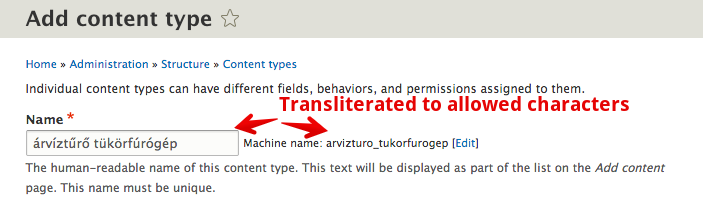


You don't even need to have language module enabled to use the transliteration services. However language specific transliteration patterns are supported, and the overrides are alterable. See https://drupal.org/node/1842748 for documentation on how to tap into this new API.
While this concludes the list of new base language features, that is only one of the language related modules in core. The tidbits are far from over! Excited about Drupal 8 yet?
Issues to work on
- Transliteration is only applied to machine names in core. Files would be a natural next candidate. See existing discussions in https://drupal.org/node/1842718 (includes an early patch that includes file support) and https://drupal.org/node/567832. A specific issue for files is https://www.drupal.org/node/2492171. Contributed modules can implement transliteration for anything.

Comments 7
API function
Very good! Is there an accessible API function that you can transliterate text on demand like in the transliteration module? Thanks!
sure
Not working
Hi it seems like the constructur needs the second argument so the code
don't work.
right!
Right, it may have worked in 2014 when I posted about it :) Looks like now there is a transliteration class in Core which does require the module handler and then there is a transliteration class in Component that does not. The difference is support for an alter hook. You need to pass in the module handler to the Core one. So that would become:
In a global scope at least.
Removing accents in D8
Thanks for this article. We're busy with a Hungarian site and I need to replace the accents in URLs, how can I do this? With D7 you would use pathauto and transliteration but with D8 I do not know. Any suggestions?
pathauto itself
Pathauto itself should do the trick.
Transliteration for Indian
Transliteration for Indian languages needs improvement though. I will try to contribute that.