This is a very long post, but trust me, it is worth it!
Upgrade Status is a Drupal module I maintain and is the centerpiece of getting a Drupal site ready for the next major version of Drupal core. It is currently used by more than 70,000 sites, and I hope this new version makes the work on all those sites significantly easier!
You can use this new version on Drupal 10 to prepare for Drupal 11, which is very timely given the end of life of Drupal 10 next month. You can also use this new version on Drupal 11 to prepare your contributed or custom modules for Drupal 12, which will be released on the week of December 7, 2026. This helps ensure the new major core version is solid.
Version 5 of Upgrade Status itself started as a Drupal 12 compatibility update, but ended up better in every way I can think of:
- More checks. Twice as many checkers, which look for about three times as many kinds of problems!
- A rethought report. Redesigned and refined report, now looks good in the three main admin themes, even in dark mode. The categories of problems are named by what the fix depends on, so you can tell at a glance what to do now and what can wait.
- Faster. Analyzing all projects again takes less than half the time, and analyzing a module again after you analyzed others is more than four times faster. This makes repeated verification while working on fixes almost effortless. After the analysis, the report page of a demo site with 82 projects is also generated in 32% less time with 91% fewer database queries, despite directly checking a lot more environment conditions.
- Modern extensibility. Add checks from your own module with tagged services!
- Output for every use. Reading the results in a browser or a CLI, or using them in a CI job, was already possible. Spreadsheet output and AI-agent-friendly text reports are new.
One important thing that did not change is that Upgrade Status is a set of deterministic tools: PHPStan rules plus checks written in PHP. No AI is involved when you run it. You get the same results for the same code every time, and no LLMs, API keys, subscriptions or remote intelligence is involved in the analysis. You data is not sent to a remote service either. On the other hand, that also makes the results a good way to verify fixes that an AI agent made. More on that below.
It all started with Drupal CMS
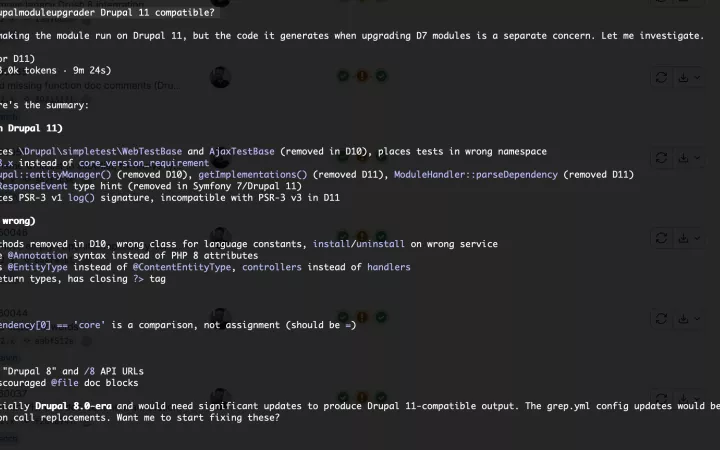
In October I set out to find what it would take to run Drupal CMS on Drupal 12. The goal was to run it, not only to scan it. I took Drupal CMS with all add-on recipes, 96 projects in total, and put it on the Drupal 12 development branch with PHP 8.5. While Upgrade Status gave a first list of problems, running every test to see what more there was to fix was really telling.
Of the 96 projects, 51 needed code fixes, and many of those fixes were for problems that the analysis tools did not report: fatal errors and exceptions, but also hooks that stopped running without any errors.
I started to see the size of the tasks ahead, so to round it out I went through the change records of Drupal core to find more deprecated APIs, and analyzed the code of Drupal 11 for deprecations it reports. That uncovered more APIs deprecated in Drupal 10 for Drupal 12, including some "new ones" (that Drupal CMS projects did not use).
The reason for the gaps is simple. PHPStan with phpstan-drupal finds deprecated PHP code that is marked with @deprecated. But a large part of the deprecations in Drupal are only reported while the code runs: when a plugin is discovered, a template is rendered, a service is created, a recipe is applied, or a script runs in the browser. Of the 996 run-time deprecation messages in Drupal 11.5 outside of tests, 409 are not triggered in a way that PHPStan can analyze.
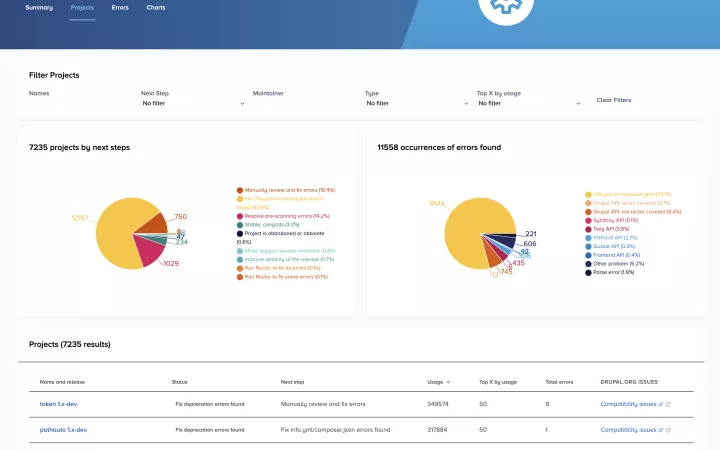
So a site could be reported "compatible" by Upgrade Status and still break on the next major Drupal version. That was always the case, but with Drupal 11 the gap was huge. While still not perfect, a big part of the gap is now closed with Upgrade Status 5.
Ideally every module has good test coverage, and running the tests on the next major version shows these problems. That is how I found most of the gaps, thanks to the tests of the modules in Drupal CMS. But many contributed modules and most custom modules have few tests or none. For those, the added checks are the only warning you get before you try the upgrade. And when trying to upgrade manually, you will not find many of the edge cases in manual testing that the tool now covers!
What is checked with Upgrade Status 5
Upgrade Status 4 already checked many things. It ran PHPStan with phpstan-drupal to find the use of deprecated PHP APIs, and that is still where most of the results come from. On top of that, seven more checkers covered:
- Deprecated Twig filters, functions and tags in templates
- Deprecated Drupal libraries used as dependencies, in theme overrides, in templates and in PHP code
- The Drupal core and PHP requirements in info files and
composer.json, and extensions marked as deprecated or obsolete - A handful of outdated checks from the Drupal 9 to 10 days, like theme functions, the
#drupal-off-canvasCSS selector and two route requirements
It also already indicated the problems that drupal-rector can fix for you. All of that stayed in place, except the checks that only made sense before Drupal 10, all of which I removed.
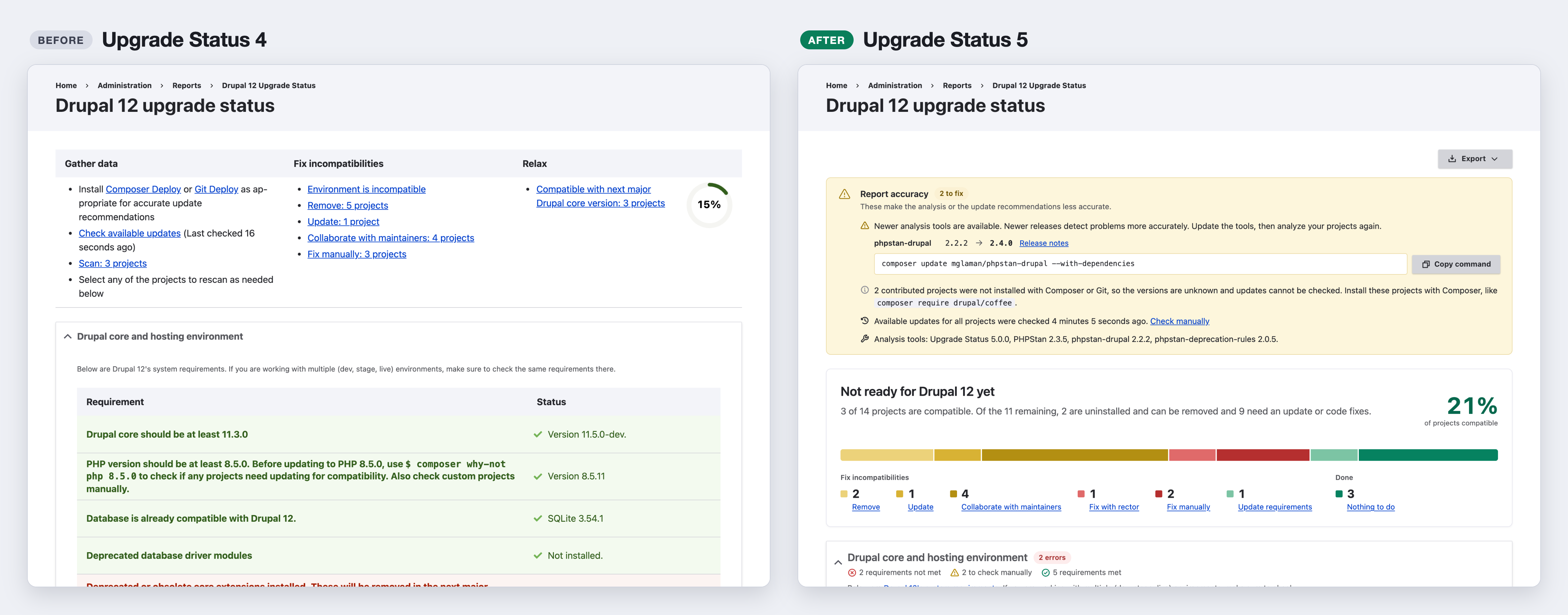
But Upgrade Status 5 has double the checkers, which look for about three times as many kinds of problems! On the small demo site in the screenshots, the exact same 14 projects have 556 reported problems on 4.x and 780 on 5.x (that is 40% more in this sample!). Of those 780, 187 are only removed after Drupal 12. These are new:
- Hooks. Hooks in include files and
hook_hook_info()groups,hook_module_implements_alter()without the legacy attribute, and implementations of deprecated hooks, which are only documented in*.api.phpfiles. - Templates and theming. Deprecated theme hooks with the templates that override those hooks, deprecated template variables,
template_preprocessfunctions,filekeys inhook_theme(), and deprecated.engineandtheme-settings.phpfiles. - JavaScript. There were no JavaScript checks at all before. Now you get deprecated JavaScript APIs, the
dialogClassdialog option even when it is set from PHP, Twig or YAML, jQuery dialog event handlers and missing core library dependencies. Scripts with a negative weight in libraries are also reported. - Libraries in more places. The
librarieskey of theme info files,libraries-overrideentries for files that moved, and the libraries of submodules, subthemes and test modules. - Config. Constraint options in schema files, deprecated config elements based on dynamic schema information, and shipped config that Drupal 11 still fixes on save but Drupal 12 does not fix anymore.
- Services and routes. Deprecated services used as an argument, a parent or a decorated service in
services.ymlfiles. And any deprecated route or route alias, in place of a fixed list of two. - Plugin definitions. Keys that Drupal 12 removes, like the
access callbackof Views handlers. - Database and session. Integer fetch modes like
\PDO::FETCH_ASSOC, and custom keys in$_SESSION. - Recipes. Recipes found in the file system are listed as projects in Upgrade Status now, and checked for uses of removed core recipes, deprecated modules and themes, and old config action names.
- Metadata. Dependencies on deprecated core modules and Composer constraints that exclude Symfony 8. The PHP requirement in
composer.jsonis now compared with the PHP requirement of the next major version. - Core constants. Deprecated constants from the include files of Drupal core, like
REQUIREMENT_ERROR, which previously were not exposed to PHPStan and therefore were not reported. That is fixed.
The environment readiness checks were extended too. On top of the Drupal core, PHP and database versions and the deprecated core extensions, you now also get checks for pending database updates (which the next major version removes), the web server, Composer and Drush for Drupal 12.
Ahead of time for Drupal 13
Drupal 12 is not out yet, but Drupal 11 already has deprecations that are only removed in Drupal 13. There is already coverage for .module, .profile and .theme files, which were all deprecated in Drupal 11.5. Drupal 13 will remove support for these. The check for this is already in Upgrade Status 5, and you get the results on Drupal 11 too. Nearly every module has these files, with nothing required to do yet. So the results are in the "After Drupal 12" category, which you can skip for now: those messages do not count as problems of a project and do not change the next step for the project. Files that are kept for older Drupal versions with the LegacyHook or ExtensionFileIsConverted attributes are not reported. Of 75 modules and themes I checked from Drupal CMS, 56 have .module files to convert when Drupal 13 readiness is considered.
On top of those, deprecated libraries, theme hooks, template variables, services, routes, hooks, config schema elements, modules and themes are all read from Drupal core and the extension projects on your site. So you will get those deprecations analyzed for Drupal 13 without waiting for a new release of Upgrade Status. As before, problems that are reported but only removed in later major versions are listed in a separate category, which is now named "After Drupal 12". On a test site with 82 projects, there are almost 500 of these already: the files above, deprecations in PHP that only matter for PHP 9, and uses of APIs like drupal_static(), which Drupal 11.5 deprecated but Drupal 12 still supports.
Fixes to upstream tools
While working on this, I found some gaps in the tools that Upgrade Status depends on, so I reported those gaps in the issue queues of the tools:
- PHPStan did not report the use of a deprecated method or property when the type was nullable, like
Request|null. That hid real problems, for examplegetCurrentRequest()->get(). I reported it as phpstan/phpstan#15681, and it is already fixed. - phpstan-drupal had three gaps:
- Plugin managers with only an annotation class and no attribute class were not reported. Björn Brala built the rules for those in pull request 1068, which is also already merged. I tested the rules on 75 projects: all nine affected projects were reported, with no false reports.
- The deprecated
$entity->originalproperty is not reported yet. I submitted issue 1074 and pull request 1076. This still needs work to resolve. - Constraint plugin classes without the required
#[HasNamedArguments]attribute are not reported yet. I submitted issue 1075 and pull request 1077. This also needs more work to resolve.
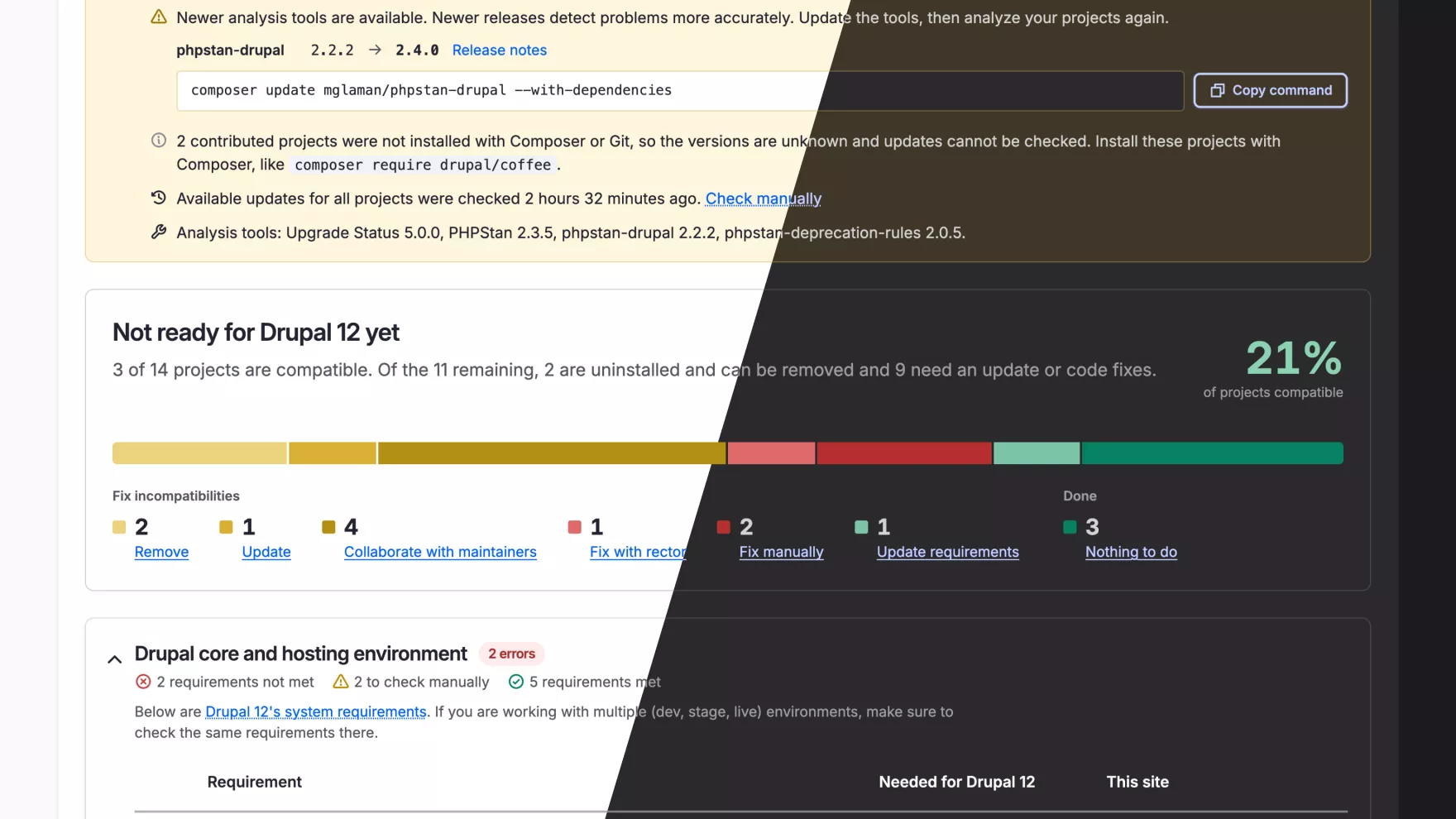
You get each of these in Upgrade Status as soon as a release of the tool has it, with no change in the module. Since the results depend this much on the versions of the tools, the top of the report now shows when a newer PHPStan, phpstan-drupal or Upgrade Status is available, with the Composer command to update. More on that below.
Visual redesign from top to bottom
Upgrade Status always grouped your projects by next step: remove, update, collaborate with maintainers, fix with rector, fix manually. The idea is that you want to know what to do next, not just the status of projects. That is the same in version 5. I redesigned everything around those groups, though.
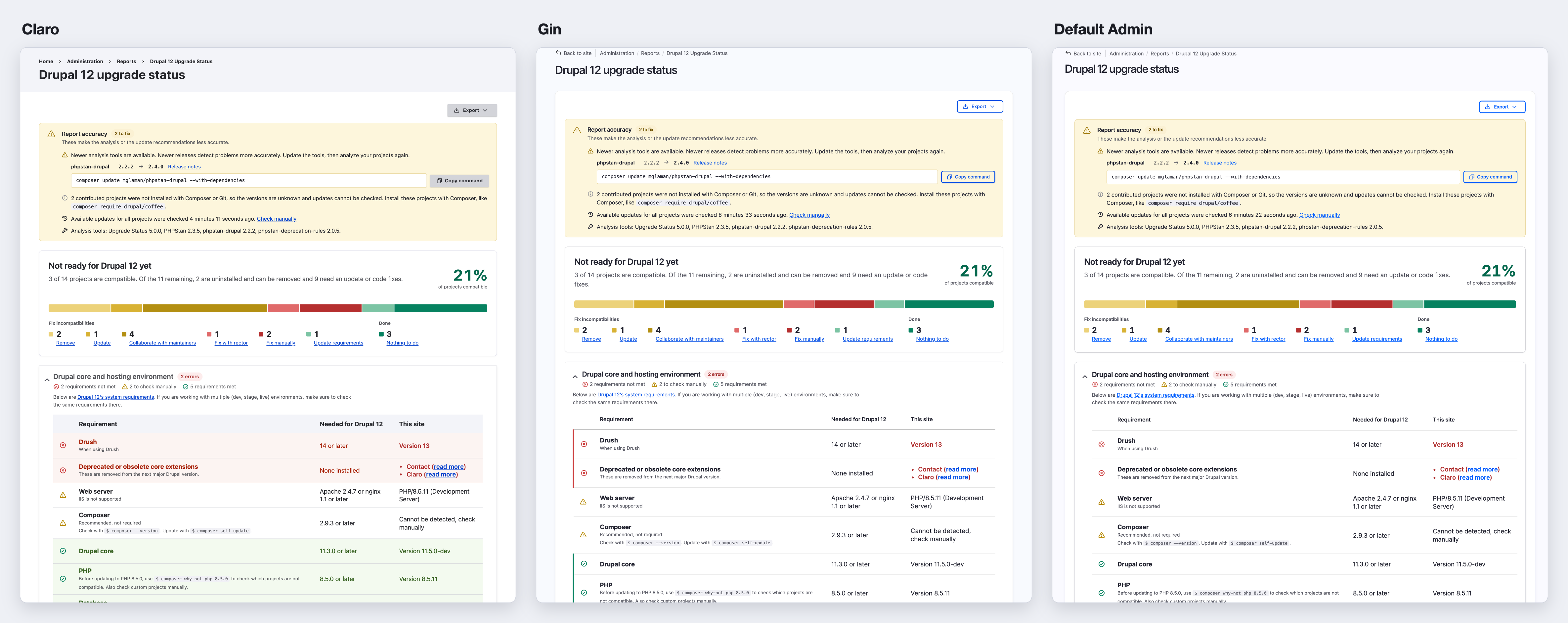
The old report had a few specific styles for Gin only. For version 5 I redesigned the pages for Claro, Gin and the new Default Admin theme, with dark mode support in Gin and Default Admin.
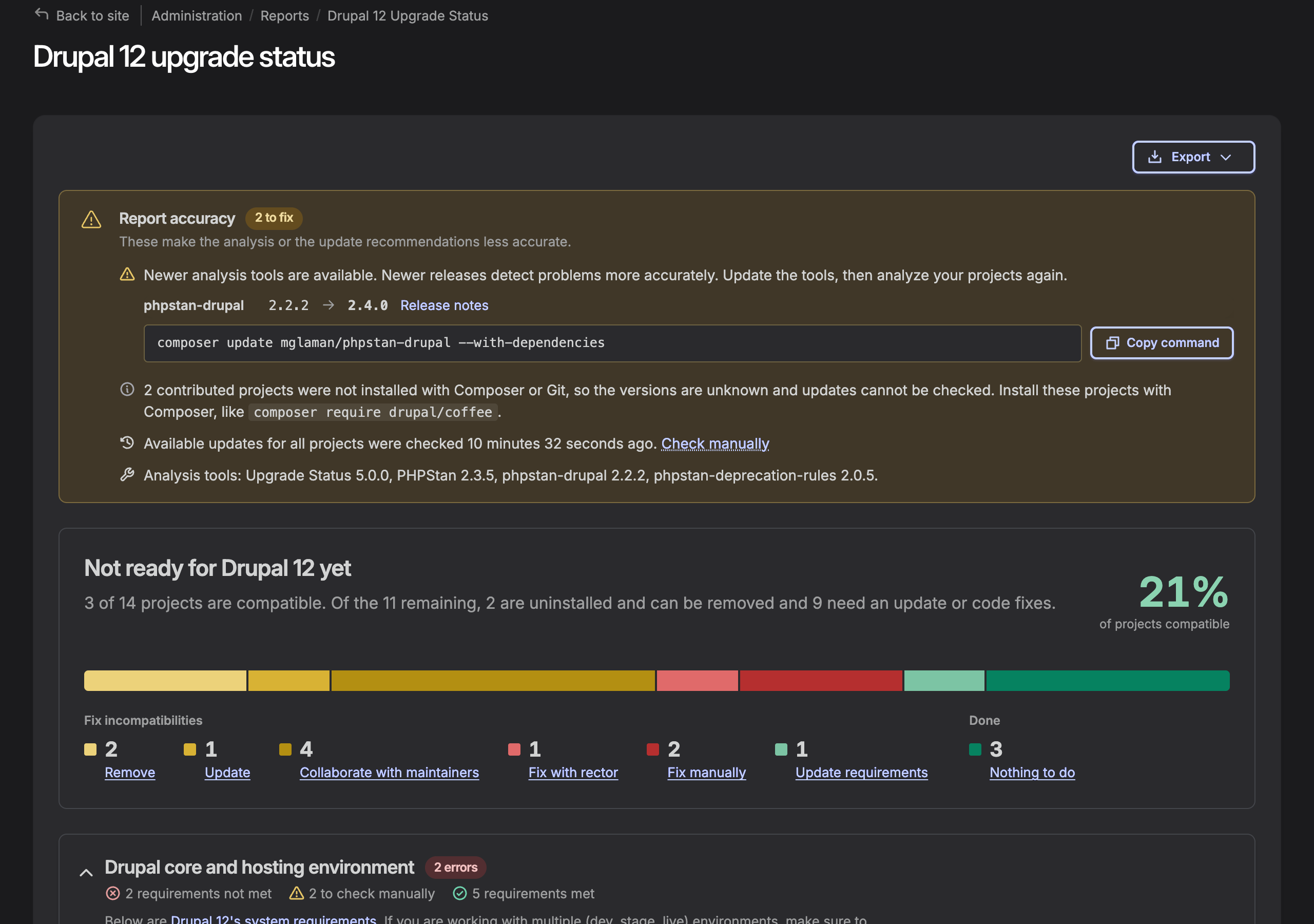
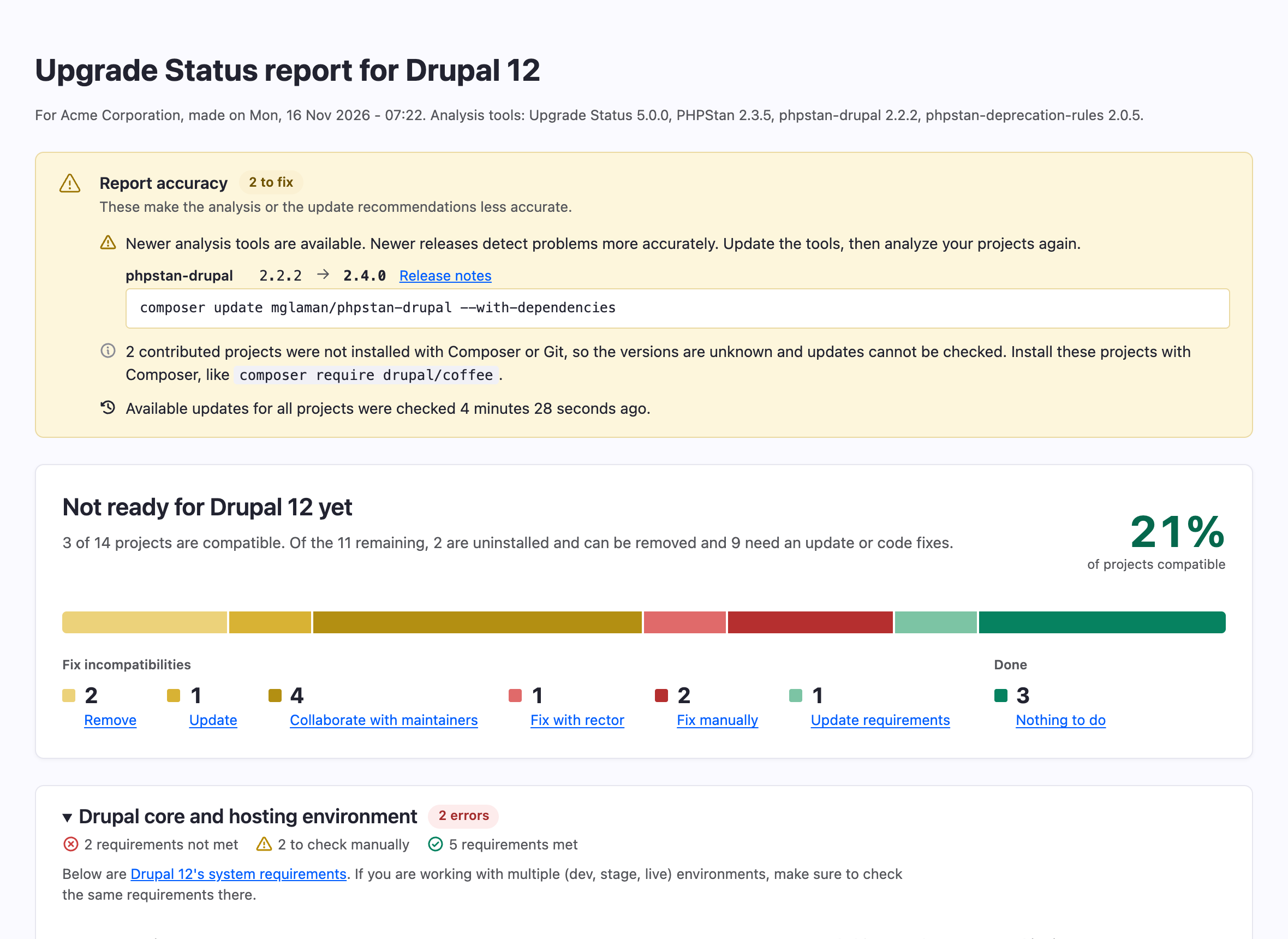
The state of the site at a glance
The top of the page used to be a three-column table of links with the percentage of completed projects in a circle. Now you get the projects in all stages visualized and linked, so progress is easier to see at a glance.
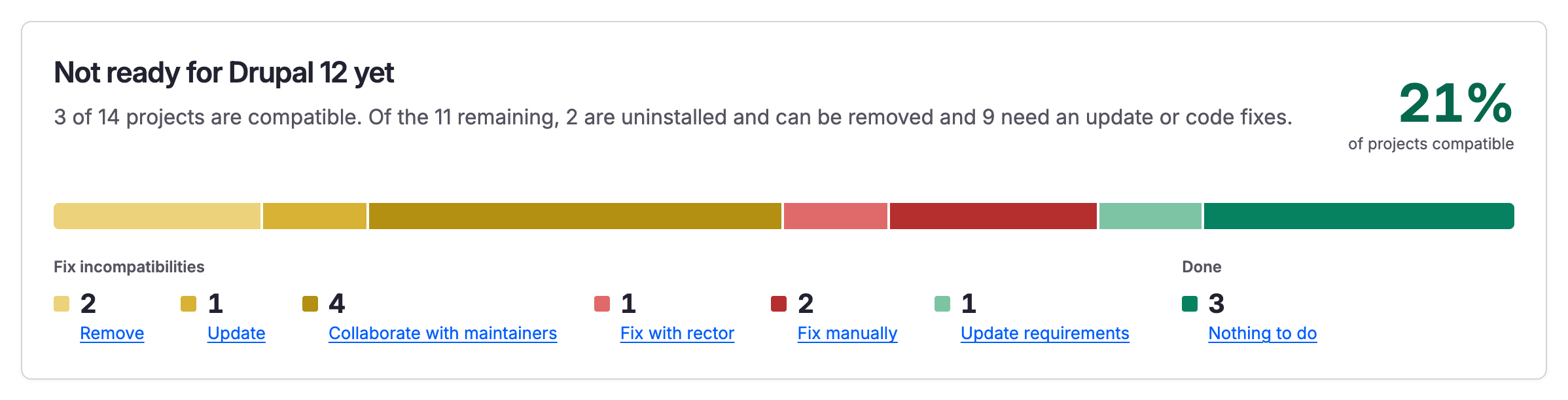
How much to trust the report
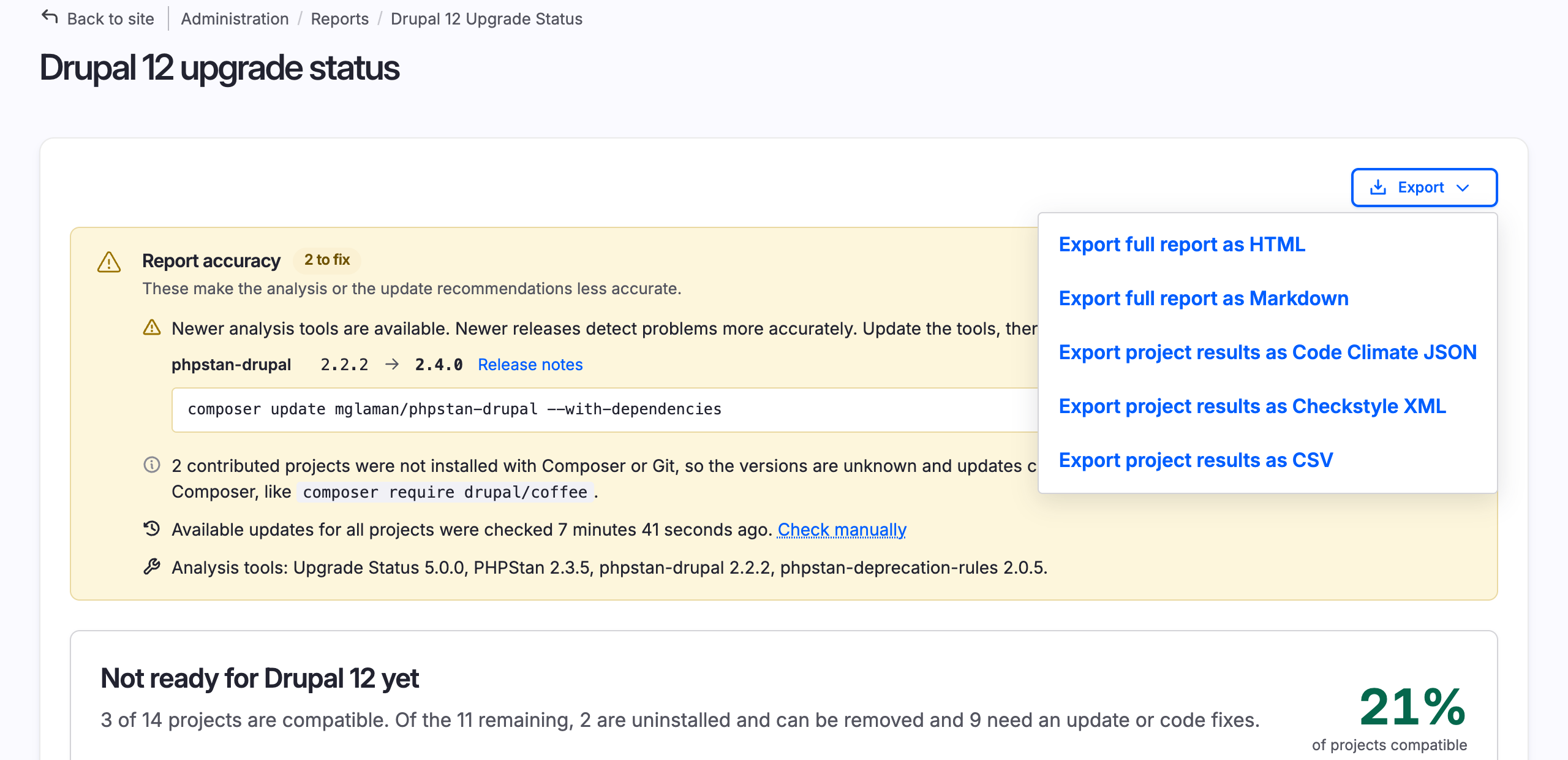
The old page had two hints for this: install Composer Deploy or Git Deploy, and check for available updates. In the new "Report accuracy" section you find everything that makes the report less reliable: newer versions of the analysis tools may be available, project update data may be out of date, projects without version information lead to missing update suggestions, and results may have been made with older versions of the tools than the installed ones. Here you can also find the versions of the tools currently on the site. This guidance is a lot more specific and actionable, not just a general note about maybe needing to install other tools.
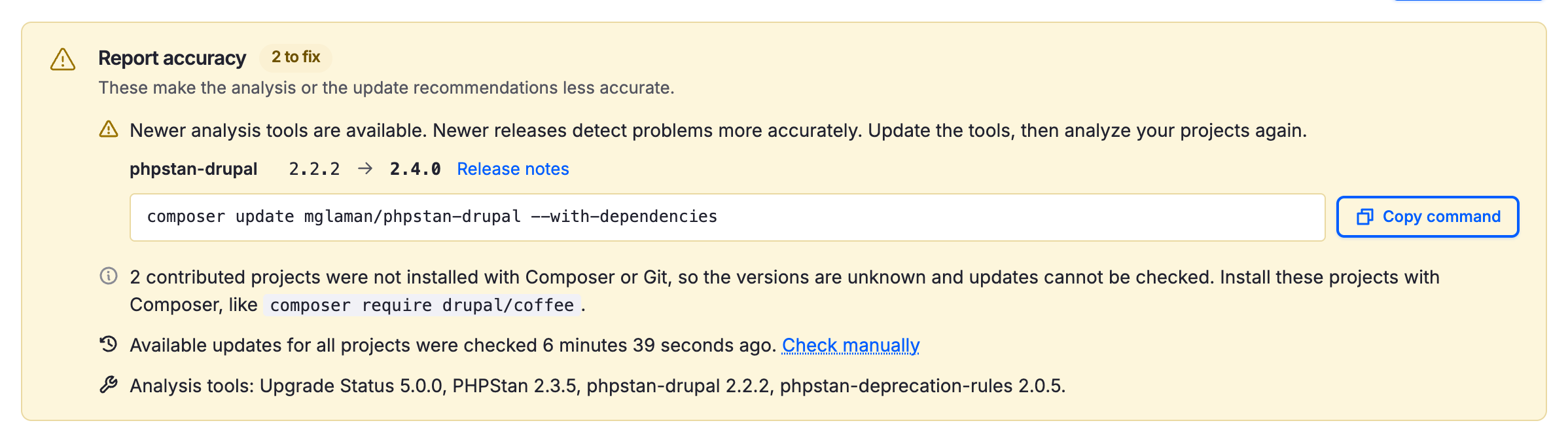
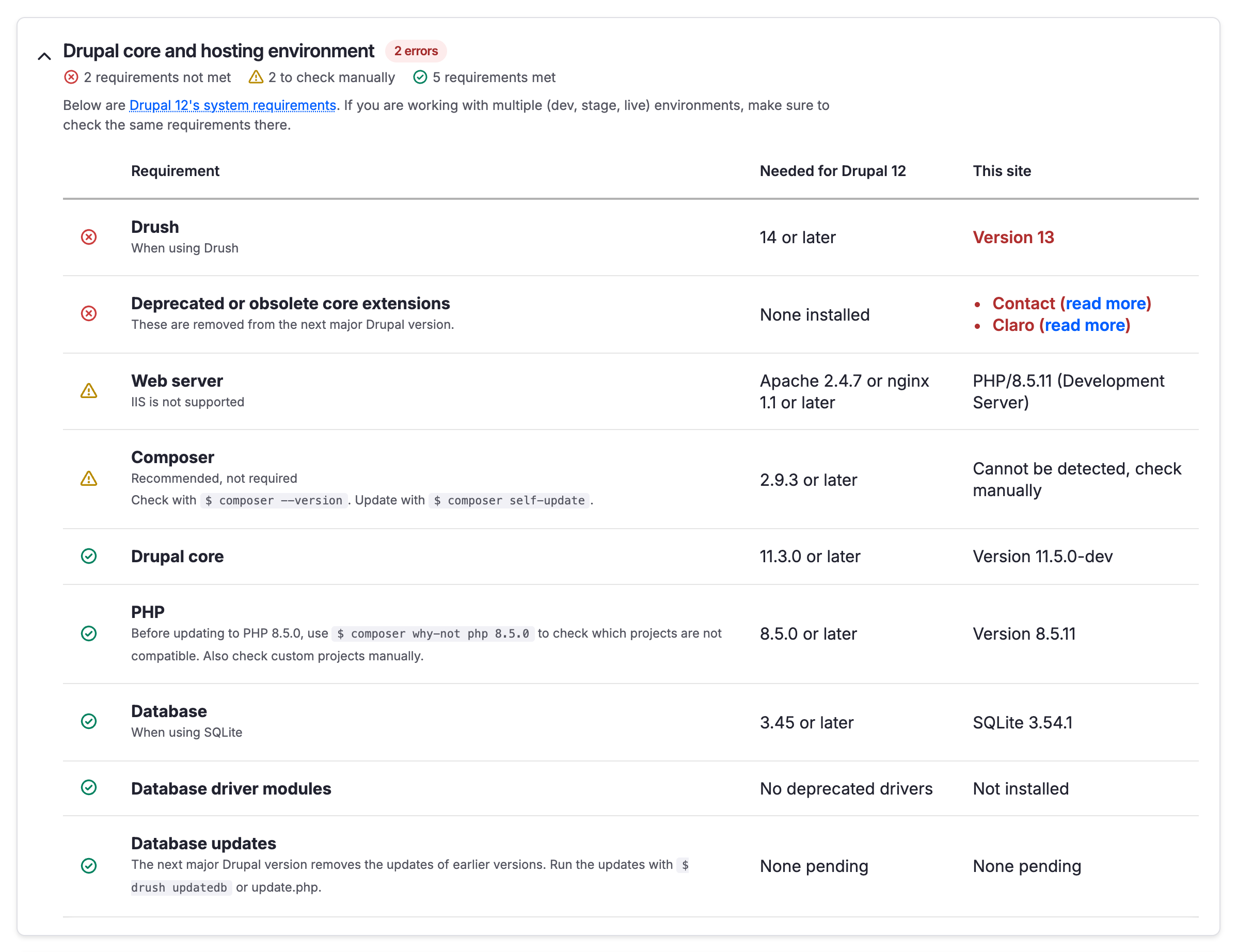
Drupal 12 requirements next to the values of the site
The environment table is not new, but now you see each Drupal 12 requirement next to the value on your site, with the requirements that are not met first. That is easier to read than the sentences in the old table.
Group summaries and security update markers
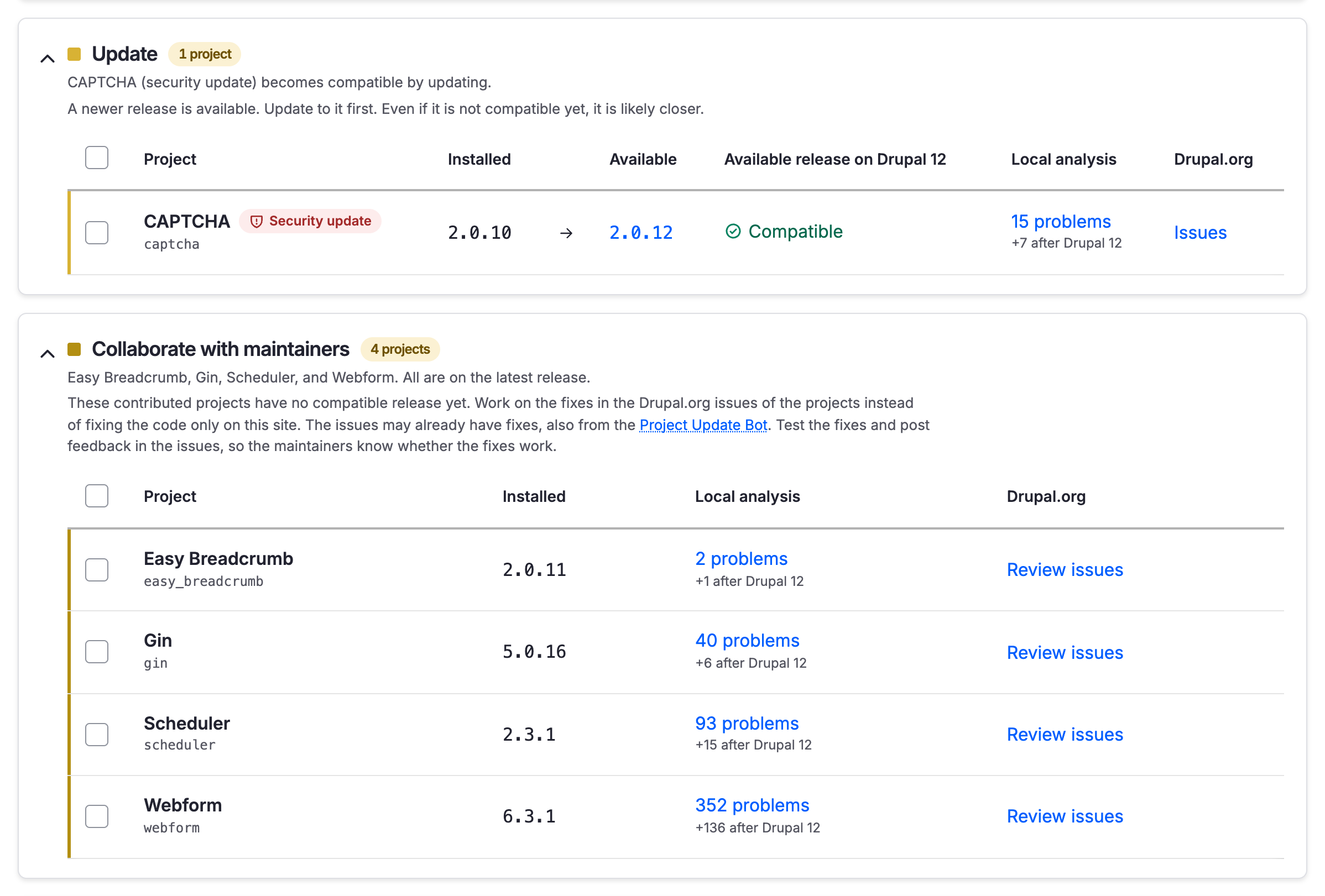
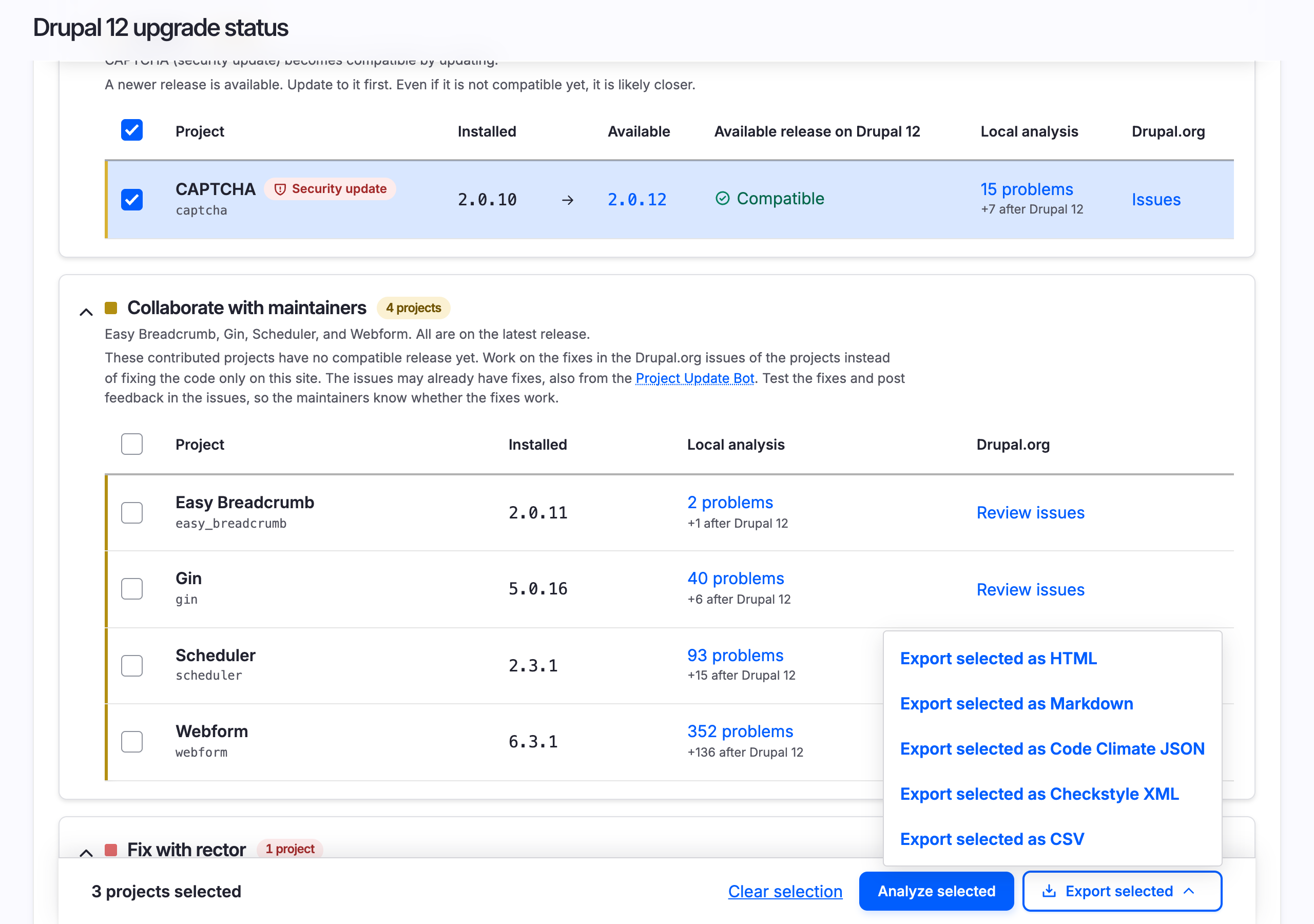
Each group of projects already had an explanation of what to do. New is a summary on top of each group, with the names of the projects and the state of the group, like "CAPTCHA (security update) becomes compatible by updating." or "Easy Breadcrumb, Gin, Scheduler, and Webform. All are on the latest release." You can read the state of the site from the summaries alone, without opening a group.
Projects with a pending security update are also marked with a "Security update" pill, so you can do those updates first.
Some groups are lighter to read too. Every group used to be a table with the same nine columns, so the same values were repeated in row after row in some groups, like "Not applicable" or "Unavailable" for custom project updates. Now each group has only the columns that matter for that group. The update group has the installed and the available release side by side. The groups of custom projects to fix only have the type and the results of the analysis. Projects to remove as well as uninstalled compatible projects have no details to compare, so those are compact lists of names.
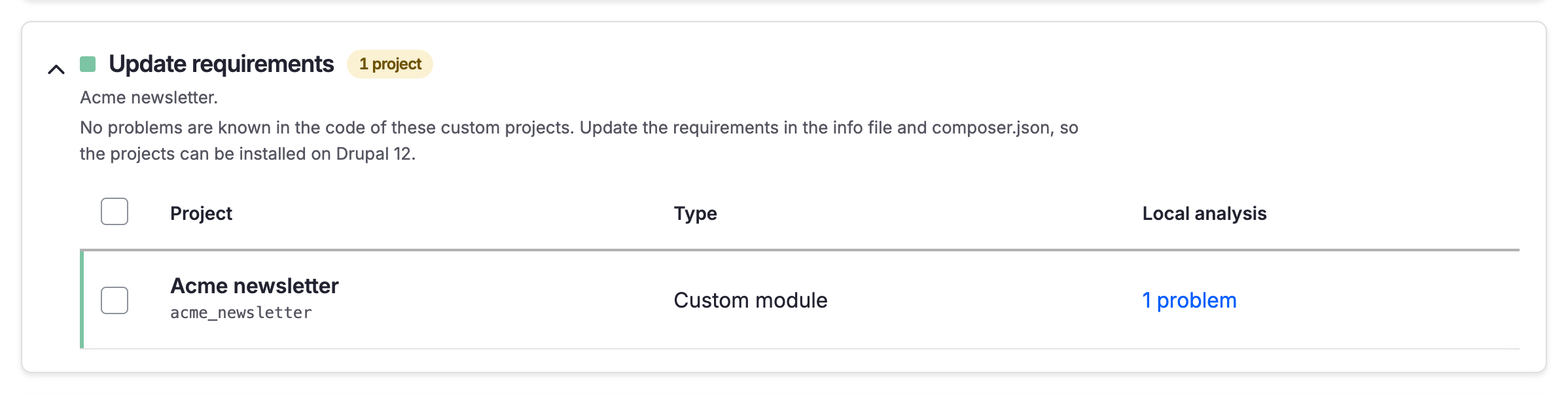
There is one new group too: Update requirements. In version 4, a custom project where only the Drupal core or PHP requirement in the info file or composer.json was left to update was under "Fix manually", next to projects with real problems in the code. Now those projects are in a group apart, as the last and easiest step.
I wanted to use this redesign to make the nudge to work with the community stronger as well. The "Collaborate with maintainers" group used to mention that there may be issues on Drupal.org. Now the advice is more direct: work on the fixes in the Drupal.org issues of the projects instead of fixing the code only on your site, test the fixes that are already there, and post feedback so the maintainers know whether the fixes work. Each project has an issues link as before, but this did not work for GitLab managed projects on version 4. Now the link works for both GitLab and Drupal.org issue queues.
Per-project results are now a full page
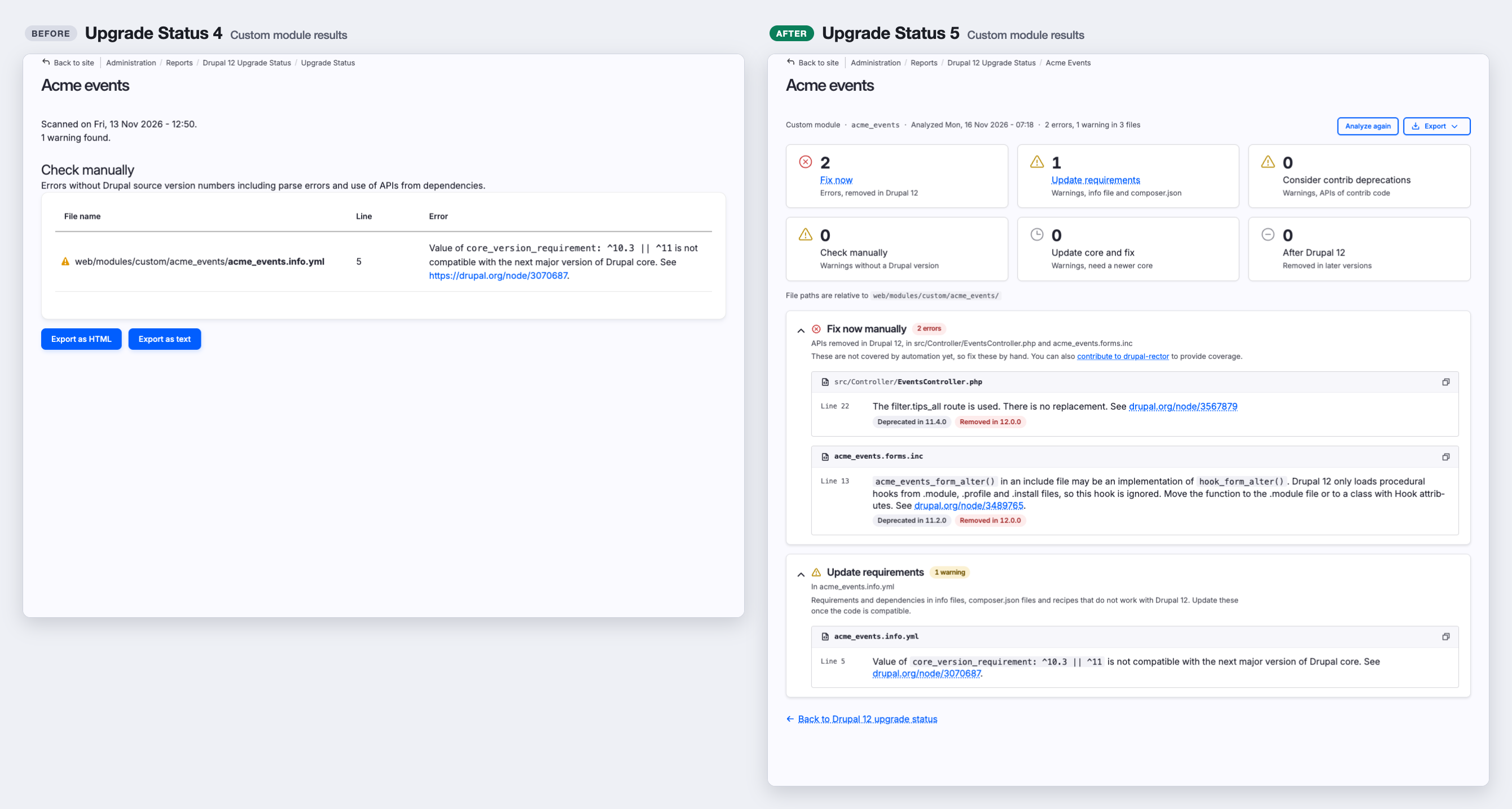
In 4.x the results of a project opened in a modal dialog, with a table of problems for each category. I opted for a full page now to allow for an easier-to-read visual presentation and better support for working on the fixes of a specific module.
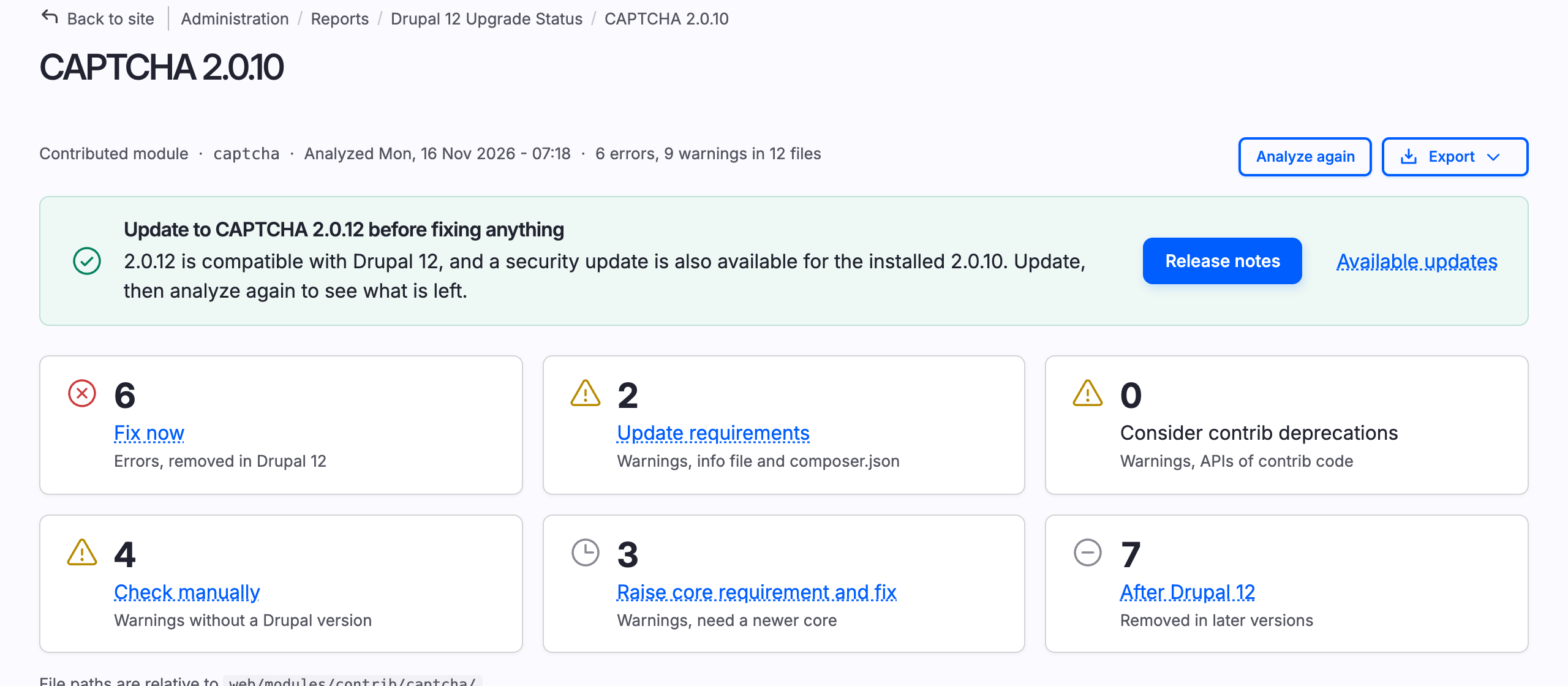
The advice to update first used to be only on the report page. Now it is on top of the results of an affected project too, with a note if there is also a security update for the installed release:
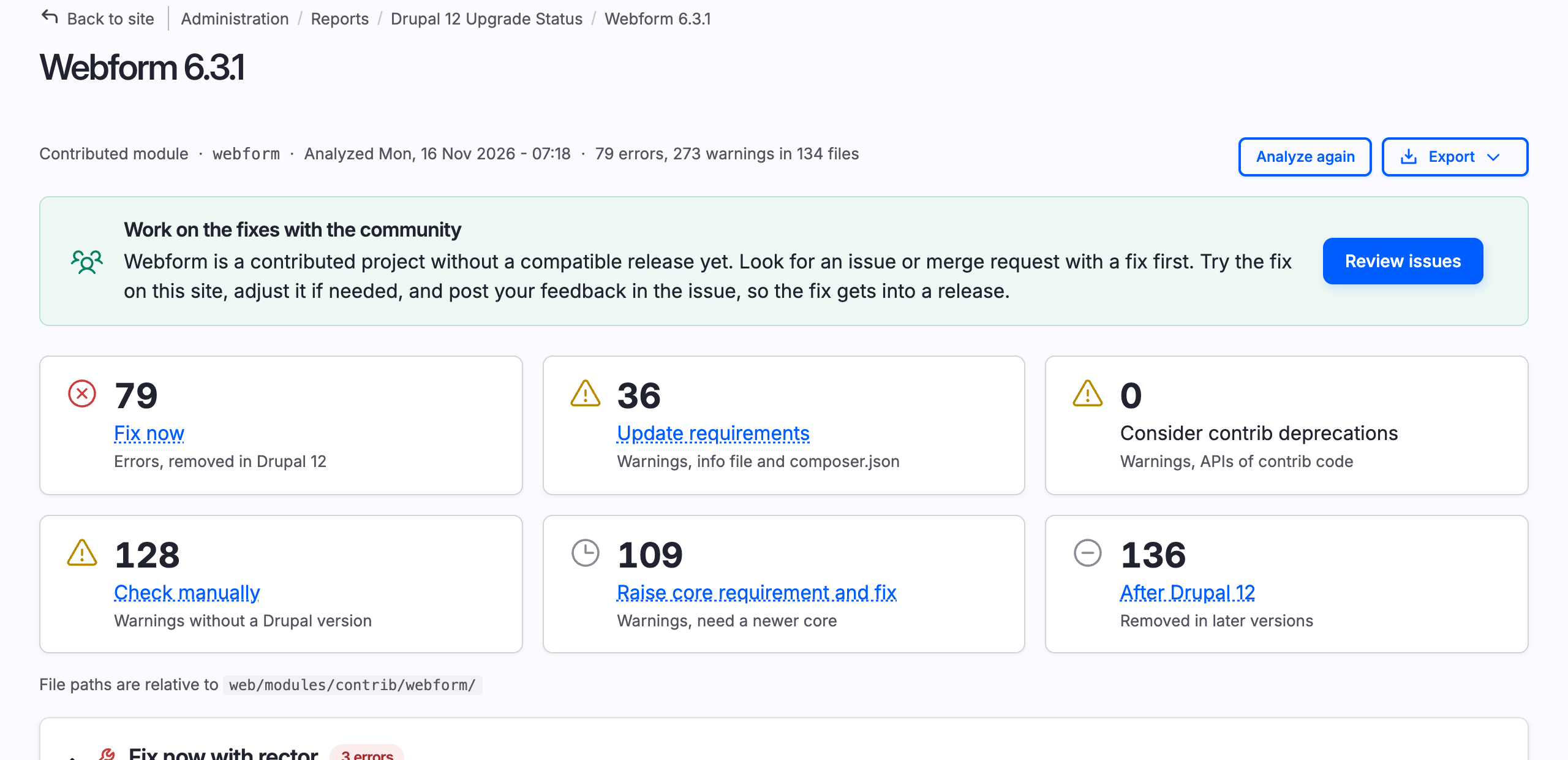
Contributed projects without a compatible release had no advice in the results at all. Now you get a nudge there too: look for an issue or merge request with a fix first, try the fix on your site, adjust it if needed, and post your feedback so the fix gets into a release. The link to the issues of the project on Drupal.org is right there, because fixes are worth a lot more in the issue queue than in a patch on your own site:
What is new on the page of a project:
- Counters and summaries. Six counters at the top show how many problems are in each category. Each category then starts with a summary of the problems and the files, like "APIs removed in Drupal 12, in captcha.install, src/Element/Captcha.php and 2 more".
- Version badges. The versions where an API was deprecated and removed used to be part of the message text. Now the versions are badges that you can spot at a glance, not hidden at variable positions in the text.
- Analyze again. When you work on one module, you do not need to go back to the report anymore. Fix problems, press "Analyze again" on the page of the project, and you get the new results on the same page. With version 5 this is much faster even when you analyzed other projects in between. More on that below.
- Copy the path of a file. File paths are now shortened for easier reading. However, with a new button at the end of each file header you can copy the full path for CLI, IDE or LLM use.
Categories expanded and refined
Version 4 put each problem in one of five categories: "Fix now with automation", "Fix now manually", "Check manually", "Fix later" and "Ignore". I always found "Fix later" and "Ignore" confusing, because the two sound so much alike. Whatever I ignore now, I fix later, right? Yet the two were very different. "Fix later" was for APIs that Drupal 12 already removes, where you can only apply the fix in a contributed project by dropping support for older versions of Drupal core. "Ignore" was for APIs that are only removed after Drupal 12. I had to look up which one was which again and again, and I maintain the module! True story.
So in version 5, I named each category by what the fix depends on:
| Version 4 | Version 5 | What it means |
|---|---|---|
| Fix now with automation | Fix now with rector | Removed in Drupal 12, and drupal-rector can fix it for you. |
| Fix now manually | Fix now manually | Removed in Drupal 12, and drupal-rector has no rule for it yet. |
| Fix later | Raise core requirement and fix (contributed projects) or Update core and fix (custom projects) | Removed in Drupal 12, but the fix only works from a newer version of Drupal core. In a contributed project you have to drop older core versions for the fix. In a custom project you have to update core on the site first. |
| Ignore | After Drupal 12 | Only removed in Drupal 13 or later. Not required to fix for Drupal 12. |
| Check manually | Update requirements | Requirements in info files, composer.json files and recipes that do not allow Drupal 12. Update these once the code is compatible. |
| Consider contrib deprecations | Deprecated APIs of contributed modules and themes. These are removed in a release of that module or theme, not with Drupal 12. | |
| Check manually | What is left: messages without a version, like parse errors and code that could not be checked. |
With the old name, "Fix later" sounded like something to put off. Now the name is the task: raise the core requirement of the project, usually in a new branch, and then fix the code. And "After Drupal 12" is exactly that, with no room to mix up the two.
"Check manually" used to be a mix of very different things, so I split that category in three. On my test site with 82 projects, that one category had 3,133 messages. Now 230 of those are under "Update requirements", 296 are under "Consider contrib deprecations", and 2,607 are left to check manually.
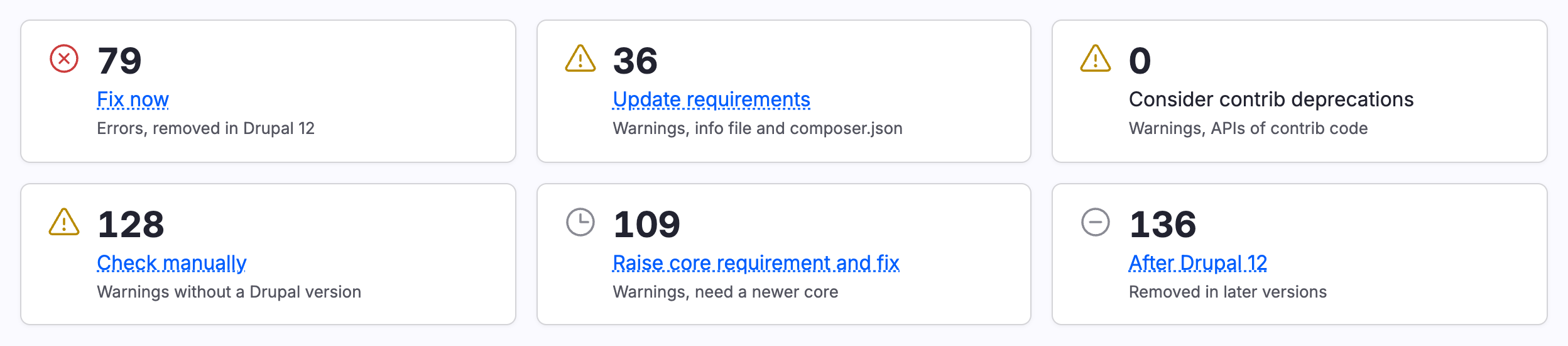
Messages for after Drupal 12 no longer count as problems of a project either. You get that number apart, like "15 problems, +7 after Drupal 12" for CAPTCHA on the demo site. Those messages do not change the next step for a project, and do not make the analyze command exit with an error code.
Export for every reader
With Upgrade Status 4 you could only export the results of selected projects, as HTML or as text with ASCII tables. There was no way to get the whole site status report. Now you can also export the whole report, with the summary and the environment checks, and you can pick from five formats:
- HTML to attach to an internal ticket or send to a client. It is a single file, with no scripts or images loaded from anywhere else, but still visually easy to read (unlike the bland black and white HTML output of version 4).
- Markdown for the most compact summary, especially good if you want to give it to an AI agent. This replaces the heavy text export, which wrapped file paths and made it very hard to search for strings in the result.
- CSV for spreadsheet wizards. Sort and filter the problems in your favorite spreadsheet app, estimate the work and assign it.
- Code Climate JSON for CI. It is the format of GitLab Code Quality, so you can expose and work on outstanding problems directly in merge requests.
- Checkstyle XML for Jenkins and the many other CI tools and editors that read that format.
The last two were already there in Drush. Now you can get them from the UI too, for consistency and discoverability. Exports include the versions of the tools that were used for the analysis.
Selecting projects to analyze or export is not new, but the buttons used to be at the very end of a long page. Now you get a floating bar at the bottom of the window as soon as you select a project, with the number of selected projects and the actions:
Made for the command line, CI and AI agent friendly
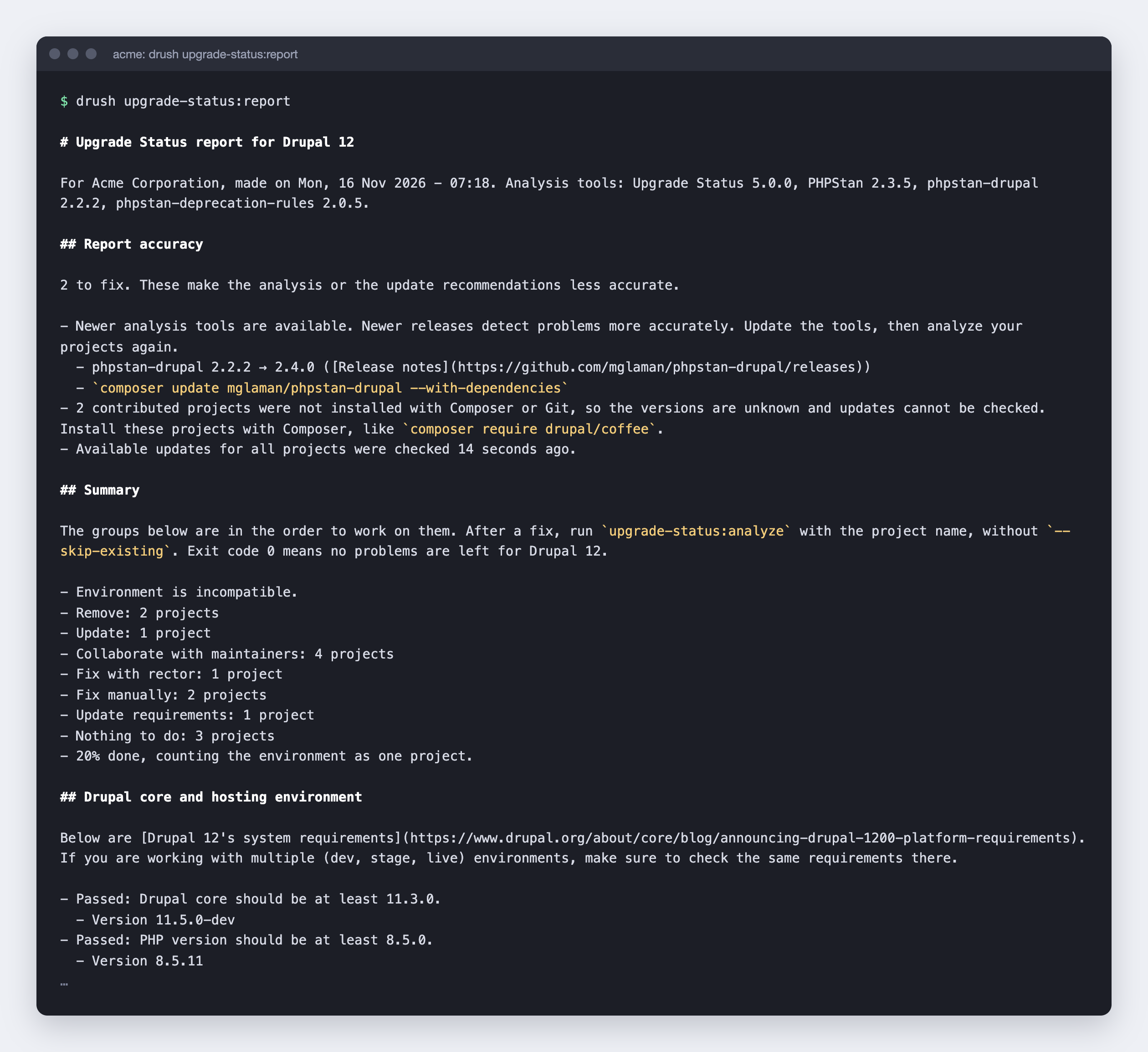
drush upgrade-status:report
drush upgrade-status:analyze my_module --format=codeclimate
- A new report command. Upgrade Status 4 only had the analyze command. With
upgrade-status:reportyou get the same overview as on the page: the environment, the accuracy notes, and the projects by next step. - Markdown in place of ASCII tables. The plain output used to be a table of fixed width. The file name was on a line apart from the errors, and messages were wrapped at 60 characters, so long class names were cut in the middle. That made searching for a name or copying a name impossible. The plain output is Markdown now, with one line for each problem, under the file and the category. Paths, class names and links are not cut anymore. That is better for people, and for AI agents too: Markdown works well as input for agents, and the output is much shorter, so it costs fewer tokens. For three sample contributed modules the output went from 21,894 characters to 9,379, with the same messages.
- Drush and
dr. You can run both commands with Drush 13 and later, and now also withvendor/bin/dr, the built-in command line tool of Drupal core since 11.4. - HTML and CSV formats are new to the CLI, next to Checkstyle XML and Code Climate JSON, which the analyze command already had. This makes export formats consistent in the UI and the CLI.
- Fits well into CI. As before, the analyze command exits with an error code when a project has problems, so you can fail a job with it, and you can leave out contributed, custom or uninstalled projects with options. New is that problems which are only for after Drupal 12 do not fail the job anymore. The Upgrade Status job of the GitLab CI templates of Drupal.org installs the latest stable release, so you get version 5 there with no change to your pipeline.
Use it to help verify AI-generated fixes. No AI is involved in the analysis, so the results do not depend on prompts or models. That makes the results a good check on the work of an AI agent. Using drush upgrade-status:report and drush upgrade-status:analyze plus drupal-rector can get you a long way, hopefully leaving little to fill in with LLM tokens. I revised the descriptions of the groups and categories with humans and agents both in mind: you find what to do first, which command to run, and how to check a fix right in the output. Manual review of the code is still important after that.
Add checks from your own module
Upgrade Status 4 had two alter hooks, for the batch operations and for the display of the results, but that would have been a very hacky way to add more checks and would have only worked in the UI where batches are run. I don't believe anyone tried hacking it that way. So in practice every check had to be part of Upgrade Status. In 5.x a check is a regular Drupal service with a tag:
services:
  my_module.my_analyzer:
    class: Drupal\my_module\MyAnalyzer
    tags:
      - { name: upgrade_status.analyzer }
The class implements AnalyzerInterface. It has one method that returns whether the analyzer applies to a project, and one that returns messages. If your module has its own API, you can ship the check for the deprecations of that API with the module. A message with text like "Deprecated in drupal:11.3.0 and is removed from drupal:12.0.0" is put in the right category without more code. All thirteen checkers of Upgrade Status use the same interface. (And the two alter hooks are gone in 5.x.)
Same speed on initial runs, much faster on reruns
More checks usually mean a slower tool. But thanks to optimizations in the report and analyzers, the results are produced at the same speed, or in the case of reruns, significantly faster than before.
| Upgrade Status 4 | Upgrade Status 5 | |
|---|---|---|
| Report page on site with 82 projects | 47 ms, 444 database queries | 32 ms, 39 database queries |
| First analysis of 82 projects | 159 s | 165 s |
| The same projects again | 152 s | 74 s |
| Analyzing Webform (a really big module) again, after other projects ran | 9.9 s | 2.2 s |
The first analysis takes about as long as before, with twice as many checkers. Analyzing all projects again is twice as fast, and analyzing a big module like Webform again after other projects ran is more than four times faster.
The report page of this large site is generated with 91% fewer database queries, in a third less time.
How I got there:
- Directories are read once. Each checker used to scan the directories of a project separately. For one large module that added up to 16,888
glob()calls and 1,606scandir()calls. Now one service reads each directory once for all checkers. - Directories without code of the project are skipped by every checker:
node_modules,bower_components, and hidden directories like.git. Before, three of the scans still includednode_modules. - PHPStan is not started for a project without PHP files, like most recipes and some themes. It used to run with nothing to analyze.
- The PHPStan cache is kept for each project. PHPStan has one result cache, which only helped when you analyzed the same project twice in a row. Upgrade Status 5 keeps a copy for each project. So after a
composer updateonly the changed projects take the full time, and "Analyze again" is also quick after you analyzed other projects in between. - The report page loads the results in groups in place of one project at a time, and the check for pending database updates does not scan the codebase.
And a cherry on top, from Ondřej Mirtes: PHPStan 2.3.6 just came out with a more precise result cache. Until now, every time a new class or function appeared in the codebase, PHPStan analyzed all files with errors again, in case one of the errors was about that class or function. For Upgrade Status that is a lot of files, because the files with errors are the ones in your report. Now PHPStan records where an unknown class or function was looked up, and only analyzes those files again. Upgrade Status 5 keeps the result cache of each project, so you get this for every project when you analyze again. Update with composer update phpstan/phpstan. The report accuracy section shows when a newer PHPStan is available, too.
Version 5 is lighter to install too. It has two Composer requirements fewer than version 4: nikic/php-parser and dekor/php-array-table are no longer needed. You can still use it with Drush 13 and 14, and on Drupal 10.4 and later, as well as Drupal 11 and 12.
Lots of old issues resolved
Alongside the new checks, this was the right time to go through and triage the issue queue too. Many of the issues closed for this release were open for years, with a lot of people reporting, debugging and proposing fixes along the way. I built on all of that, so thanks! We fixed:
- JavaScript calls to deprecated APIs are not found (from 2019)
- Export results and projects as CSV (from 2020)
- A setting for the PHP binary and finding PHPStan with the data of Composer (both from 2021). "PHPStan not found" and wrong PHP binaries were the most common reasons the module did not work on a host. 23 people are credited on these two issues alone!
- Checking for deprecated config elements based on schema (from 2021)
- Detecting dependencies on deprecated core modules (from 2022)
- Checking for deprecated Twig templates (from 2023)
- Checking for pending database updates, deprecated libraries in theme info files, deprecated hooks, and skipping test classes when PHPUnit is not installed in place of hundreds of false errors (all from 2024)
- A separate temporary directory for each site and user, so there are no more conflicts between two sites on one server, between multisites, and between the web server and the command line (from 2025)
- Reported bugs: an error in one Twig template no longer stops the analysis of the other templates (from 2023), the release suggested for a project is now one that works with your Drupal version (from 2024), and core themes like Claro are no longer listed as projects to analyze on Drupal 11.4 and later.
- More accurate categories: by the names of version 4, a problem used to get "Fix now" or "Fix later" only when the message had the exact wording "Deprecated in drupal:X". Other wordings, like the run-time messages of Drupal core, were left under "Check manually". Now all of those get a category by version, along with Symfony, Twig and PHP deprecations. Custom projects also got the categories of contributed projects, so problems that you could fix right away were under "Fix later". That is fixed too.
Thanks to 50+ contributors 💙
There are 108 commits and 79 issues between the last 4.x release and this one, and more than 50 people are credited on those, many for issues reported years ago. Thanks to afagioli, ajay gadhavana, aurora.luzzardi, axle_foley00, bbrala, bburg, betoaveiga, charly71, chr.fritsch, cobadger, csakiistvan, cslevy, dallen33, delacosta456, divya.lakshman, eelkeblok, etron770, farhanmae, fgm, gmoraleb, ifrik, joachim, joachim namyslo, joaopauloscho, jrb, kristen pol, lauriii, lhugg, liam morland, m4olivei, m_hobby, marttir, mglaman, mherchel, miha.wagner, mtift, nick hope, nickolaj, nicxvan, nod_, peri22, quietone, quimic, ressa, seanr, simgui8, solideogloria, srdtwc, superlolo95, tarasiadis, ulandreman, umac_de, varun pradeep, volkerk and zhouhana for the reports, patches, reviews and tests that led to this release.
Special thanks to Ondřej Mirtes for PHPStan and to Matt Glaman for phpstan-drupal, which the whole analysis is built on, and to Björn Brala for keeping the list of drupal-rector rules current, so you can see in the report which problems rector can fix.
As with my recent work, I used an LLM heavily to research the gaps, come up with solutions and help implement the checkers and tests. Once again, the module itself involves no AI at all when you run it.
Behind the scenes of community automation
Upgrade Status is also the report generator behind the Project Update Bot built and managed by Björn Brala. The bot posts compatibility fixes in the issues of contributed projects on Drupal.org. The bot is run with Project analysis. For each project, Upgrade Status is run first. If the report has problems, drupal-rector fixes what it can, and Upgrade Status is run again. Only when that second report has nothing left to fix does the bot also mark the project as Drupal 12 compatible in the info file and in composer.json. Then the results are posted in the issue queue of the project.
While checking how the bot works with this release, I found a way for a failed analysis to go unnoticed. The bot runs PHPStan with several worker processes. When one of those failed, for example by running out of memory, the error of PHPStan was dropped, and the report only had the results of the other checkers. So a project could pass as compatible although the PHP code was not checked at all. Version 4 had the same problem. Now the error is in the report and in the log, and the bot skips a project like that.
So once the bot runs with this release, the reports for contributed modules get much more accurate, and the fixes of the bot get better with that. A project with problems that the earlier version did not find is no longer marked as compatible. All of this right before Drupal 12 comes out. Let's get more modules ready in time!
Try it now
Run Upgrade Status 5 on your Drupal 10 or 11 site. If you update from version 4, analyze your projects again, because the results that version 4 stored have none of the new checks and categories. If you find something in the report that surprises you, that is the point: better today than on the day you update. Let me know how it goes in the issue queue. See you there!